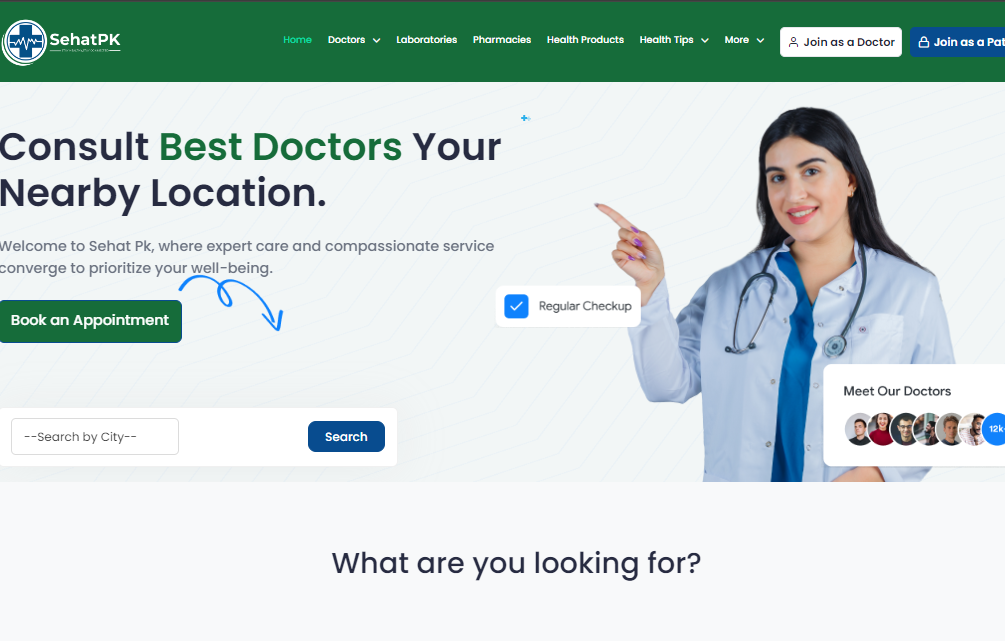
SehatPK – (HMS)
SehatPK – Comprehensive Hospital Management System (HMS)
SehatPK is a robust hospital management system (HMS) designed to streamline and automate hospital operations, enabling healthcare providers to manage patient care, administrative tasks, and medical processes efficiently. It offers end-to-end management of patient records, doctor schedules, billing, laboratory operations, pharmacy, and more. This system ensures that hospitals deliver seamless, patient-centric services while maintaining operational excellence.
Key Features of SehatPK Hospital Management System
1. Patient Management
- Registration and Admission Process:
Automates patient registration with essential information like demographics, medical history, and emergency contacts. - Inpatient and Outpatient (IPD/OPD) Management:
Tracks inpatient and outpatient visits, including admission, discharge, transfers, and referrals. - Electronic Medical Records (EMR):
Stores patient medical records, lab results, prescriptions, and treatment plans for easy access.
2. Doctor and Staff Management
- Doctor Scheduling and Appointments:
Allows doctors to set their availability, and patients can book appointments online. - Duty Roster Management:
Automates staff duty allocation and shift changes, improving workforce management. - Performance Monitoring:
Tracks doctor and staff performance through patient feedback and service records.
3. Appointment and Queue Management
- Online Appointment Booking:
Patients can schedule consultations with doctors through a web or mobile interface. - Queue Management System:
Optimizes patient flow by managing appointment slots and waiting queues efficiently. - Appointment Reminders:
Sends automatic SMS or email reminders to reduce missed appointments.
4. Pharmacy Management
- Stock Management:
Monitors medicine availability, stock levels, and expiry dates. - Integrated E-Prescriptions:
Enables doctors to prescribe medications digitally, linking with the in-house pharmacy. - Inventory Alerts:
Sends notifications when stocks are running low or medicines are expiring.
5. Laboratory Management
- Test Management:
Automates lab tests, sample tracking, and results reporting. - Integrated Diagnostics:
Links diagnostic results directly to patient profiles for seamless doctor access. - Test Billing and Reports:
Automatically generates test reports and bills for patients.
6. Billing and Insurance Management
- Automated Billing:
Generates detailed bills covering doctor fees, lab tests, pharmacy, and hospital services. - Insurance Claims Management:
Manages patient insurance claims and integrates with insurance providers for fast claim approval. - Payment Gateway Integration:
Supports multiple payment options, including credit cards, online payments, and net banking.
7. Bed and Ward Management
- Bed Allocation System:
Automates the allocation of beds to admitted patients based on availability and condition type. - Ward and ICU Management:
Tracks the status of different wards, ICUs, and emergency rooms. - Room Cleaning and Maintenance Alerts:
Notifies staff about bed sanitization and room preparation.
8. Patient Monitoring and Emergency Handling
- Real-Time Vital Monitoring:
Integrates with medical devices to track patient vitals in ICUs or emergency rooms. - Emergency Response System:
Automatically alerts emergency staff during critical events or patient emergencies. - Ambulance Management:
Manages ambulance services for emergency patient transport.
9. Admin Dashboard and Reporting
- Centralized Admin Panel:
Offers a comprehensive dashboard for managing hospital operations, including finance, HR, and patient data. - Customizable Reports and Analytics:
Provides insights into patient flow, financial status, and staff performance through detailed reports. - Compliance Management:
Ensures compliance with healthcare regulations and medical data privacy standards.
10. Inventory and Procurement Management
- Medical Equipment Tracking:
Tracks hospital equipment and ensures timely maintenance. - Procurement Workflow Automation:
Simplifies the purchase of medicines, equipment, and other hospital essentials. - Vendor Management:
Manages hospital vendors and tracks procurement requests and deliveries.
11. HR and Payroll Management
- Employee Records and Attendance:
Maintains employee profiles, including qualifications and work history, with an integrated attendance system. - Payroll Management:
Automates payroll processing, including salaries, bonuses, and deductions. - Shift Scheduling and Leave Management:
Handles staff shifts and tracks vacation or sick leaves.
12. Compliance and Security Management
- Data Security and Encryption:
Ensures that patient and hospital data is stored securely with encryption. - Role-Based Access Control:
Limits system access to authorized personnel only, ensuring privacy and security. - Audit Trails:
Tracks every action within the system to ensure transparency and accountability.
13. Mobile and Cloud Integration
- Mobile App for Patients and Staff:
Provides a mobile interface for patients to book appointments and view medical records. Staff can manage schedules on the go. - Cloud-Based Storage:
Offers cloud integration for remote access to hospital data and ensures data redundancy. - Telemedicine Integration:
Supports video consultations for remote patients.
Benefits of SehatPK Hospital Management System
1. Improved Operational Efficiency
- Automates routine hospital tasks, reducing administrative burden on staff and doctors.
- Provides real-time insights into hospital operations, leading to better decision-making.
2. Enhanced Patient Experience
- Ensures faster service with streamlined appointments, billing, and consultations.
- Improves patient satisfaction with easy access to medical records and lab reports.
3. Better Resource Management
- Optimizes hospital resources, including staff, beds, and medical equipment.
- Reduces wastage by monitoring inventory levels and sending alerts for reordering.
4. Compliance and Transparency
- Maintains compliance with healthcare regulations and ensures patient data privacy.
- Offers audit trails and reports for better transparency in hospital operations.
Development Process of SehatPK Hospital Management System
1. Requirement Analysis and Planning
- The development team conducted in-depth discussions with healthcare professionals to understand their operational needs.
- Identified key pain points in patient management, appointment booking, billing, and inventory control.
2. Design and Development
- Designed an intuitive user interface (UI) for both patients and staff, ensuring ease of use.
- Used modern frameworks such as Laravel and React for efficient and scalable development.
3. Testing and Quality Assurance
- Conducted rigorous testing across all modules, including patient management, pharmacy, and billing, to ensure error-free operations.
- Stress-tested the system to handle large volumes of data and high traffic during emergencies.
4. Deployment and Maintenance
- Successfully deployed the system in multiple hospitals and clinics.
- Provides ongoing maintenance and support to ensure smooth operations and quick resolution of issues.
Conclusion
The SehatPK Hospital Management System is a comprehensive solution that streamlines all aspects of hospital operations, from patient care to billing and administration. With features like doctor scheduling, pharmacy management, lab integration, and real-time reporting, it enhances both operational efficiency and patient satisfaction.
working SehatPK – (HMS) Process
1. Planning & Requirement Gathering
- Objective: Understand the product goals, user needs, and technical requirements.
- Activities:
- Meet with stakeholders to define business objectives and user expectations.
- Gather functional and non-functional requirements (features, performance, security, etc.).
- Gather functional and non-functional requirements (features, performance, security, etc.).
- Define timelines, budgets, and resources.
- Outcome:
- A well-defined project scope with a development roadmap and timeline.
2. Design Phase
This phase focuses on the user experience and interface design.
- Activities:
- Wireframes: Create low-fidelity layouts focusing on functionality and structure.
- Prototypes: Develop interactive prototypes to simulate user interactions.
- UI/UX Design: Finalize high-fidelity designs, applying branding and aesthetics.
- Tools: Figma, Adobe XD, Sketch
- Outcome:
- Approved design mockups and prototypes ready for development.
3. Development Phase
The product is coded and developed in this phase.
- Activities:
- Frontend Development: Develop the user interface using HTML, CSS, JavaScript, React,Vue, etc.
- Backend Development: Build the server-side logic and APIs using frameworks (Laravel).
- Database Management: Set up and manage databases (MySQL).
- Version Control: Use Git for tracking changes and collaboration.
- Agile/Scrum Methodologies: Implement sprints to divide the project into manageable tasks.
- Outcome:
- Functional product with frontend, backend, and database integrations in place.
4. Testing & Quality Assurance (QA)
Testing ensures the product is free from bugs and meets the requirements.
- Activities:
- Unit Testing: Test individual components or functions.
- Integration Testing: Ensure that different modules work together smoothly.
- User Acceptance Testing (UAT): Test with end-users to validate functionality. (MySQL).
- Performance Testing: Check speed, scalability, and load handling.
- Outcome:
- Identified and resolved bugs, and the product is validated for launch.
5. Deployment
The product is released to a live environment where users can access it.
- Activities:
- Set up servers, domains, and cloud infrastructure (AWS, Azure, or DigitalOcean).
- Deploy the code to production environments.
- Run final tests on the production server to ensure everything works smoothly.
- Outcome:
- The product is live and accessible to users.
6. Maintenance & Support
After deployment, continuous monitoring and updates are needed.
- Activities:
- Bug Fixes: Monitor for issues reported by users or through logs.
- Updates & Enhancements: Add new features or improve existing functionality.
- Performance Monitoring: Ensure uptime, speed, and reliability.
- Technical Support: Assist users with any issues they face.
- Outcome:
- Product remains functional, updated, and aligned with evolving user needs.