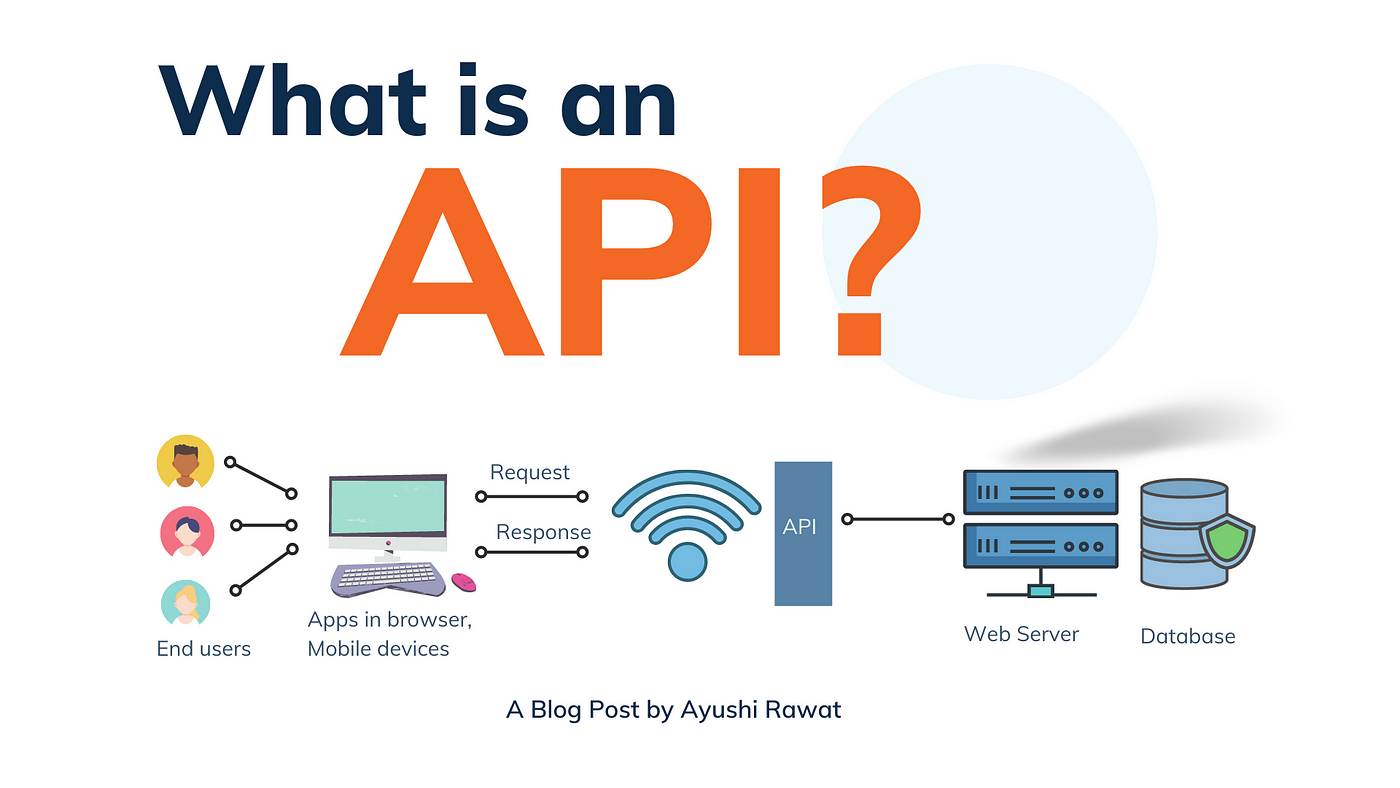
API's Development
API Development refers to the process of creating Application Programming Interfaces (APIs) that enable communication between different software applications. APIs define the methods and data formats that applications can use to communicate with each other, allowing for the integration of diverse systems and services.
Key Features of API Development
Interoperability:
- APIs facilitate communication between disparate systems, enabling them to work together seamlessly, regardless of their underlying technology.
Modularity:
- APIs promote modular design by allowing developers to create distinct components that can be independently developed, maintained, and updated.
Standardization:
- APIs establish standard protocols for communication, ensuring that data is exchanged in a consistent format, such as JSON or XML.
Security:
- Modern APIs incorporate security measures such as authentication and authorization protocols (e.g., OAuth, API keys) to protect sensitive data during transmission.
Versioning:
- API development includes versioning, which allows developers to release updates and new features without disrupting existing users. This ensures backward compatibility and a smooth transition for users.
Documentation:
- Comprehensive documentation is a crucial aspect of API development. It provides developers with clear guidelines on how to use the API, including endpoints, request methods, and data structures.
Benefits of API Development
Increased Efficiency: APIs enable faster application development by allowing developers to leverage existing services and functionalities rather than building everything from scratch.
Enhanced Collaboration: APIs facilitate collaboration between development teams by providing a clear interface for communication between different software components.
Scalability: Well-designed APIs can handle increased traffic and data volume without compromising performance, allowing applications to grow and scale effectively.
Improved User Experience: APIs can be used to create rich, interactive user experiences by integrating third-party services (e.g., payment gateways, social media sharing) into applications.
Cost Savings: By reusing existing services and components, organizations can save time and resources in application development.
Types of APIs
RESTful APIs:
- REST (Representational State Transfer) APIs are widely used for web services. They use standard HTTP methods (GET, POST, PUT, DELETE) and are stateless, making them easy to use and scalable.
SOAP APIs:
- SOAP (Simple Object Access Protocol) APIs use XML-based messaging and are often used in enterprise-level applications for their robust security features and strict standards.
GraphQL APIs:
- GraphQL is a query language for APIs that allows clients to request only the data they need. It enables more efficient data retrieval and reduces the amount of data transferred over the network.
Webhooks:
- Webhooks are HTTP callbacks that allow applications to receive real-time updates when specific events occur in another application (e.g., a payment confirmation).
Open APIs (Public APIs):
- Open APIs are publicly available APIs that allow developers to access specific features or data of an application or service. They encourage third-party integrations and innovation.
Best Practices for API Development
Design with Users in Mind:
- Consider the needs of developers who will use the API. Make the API intuitive, easy to understand, and well-documented.
Use Consistent Naming Conventions:
- Use clear and consistent naming conventions for endpoints and parameters to enhance readability and usability.
Implement Versioning:
- Plan for future changes by implementing versioning in the API design. This helps maintain backward compatibility.
Prioritize Security:
- Implement authentication and authorization protocols to protect sensitive data. Use HTTPS to encrypt data in transit.
Provide Comprehensive Documentation:
- Create detailed documentation that includes usage examples, error codes, and explanations of endpoints and data formats.
Monitor and Analyze API Performance:
- Use analytics and monitoring tools to track API usage, performance, and errors. This helps identify areas for improvement.
Use Cases for API Development
Mobile Applications:
- APIs are commonly used in mobile applications to connect to backend services, allowing users to access data and functionalities seamlessly.
E-Commerce Platforms:
- E-commerce websites use APIs to integrate payment gateways, inventory management systems, and third-party shipping services.
Social Media Integration:
- APIs enable applications to connect with social media platforms, allowing users to share content and authenticate via social login.
Data Integration:
- Organizations often use APIs to integrate various systems, such as CRM, ERP, and marketing automation tools, to streamline operations and data flow.
IoT Applications:
- APIs are essential in Internet of Things (IoT) applications, allowing devices to communicate and share data with cloud services and other devices.
Conclusion
API Development is a vital aspect of modern software development, enabling interoperability and integration between diverse applications and services. By following best practices and understanding the key features and benefits of APIs, developers can create robust, scalable, and secure APIs that enhance user experiences and drive business value. Whether for mobile apps, e-commerce platforms, or IoT applications, well-designed APIs are essential for building flexible and responsive software solutions.
working API's Development Process
1. Planning & Requirement Gathering
- Objective: Understand the product goals, user needs, and technical requirements.
- Activities:
- Meet with stakeholders to define business objectives and user expectations.
- Gather functional and non-functional requirements (features, performance, security, etc.).
- Gather functional and non-functional requirements (features, performance, security, etc.).
- Define timelines, budgets, and resources.
- Outcome:
- A well-defined project scope with a development roadmap and timeline.
2. Design Phase
This phase focuses on the user experience and interface design.
- Activities:
- Wireframes: Create low-fidelity layouts focusing on functionality and structure.
- Prototypes: Develop interactive prototypes to simulate user interactions.
- UI/UX Design: Finalize high-fidelity designs, applying branding and aesthetics.
- Tools: Figma, Adobe XD, Sketch
- Outcome:
- Approved design mockups and prototypes ready for development.
3. Development Phase
The product is coded and developed in this phase.
- Activities:
- Frontend Development: Develop the user interface using HTML, CSS, JavaScript, React,Vue, etc.
- Backend Development: Build the server-side logic and APIs using frameworks (Laravel).
- Database Management: Set up and manage databases (MySQL).
- Version Control: Use Git for tracking changes and collaboration.
- Agile/Scrum Methodologies: Implement sprints to divide the project into manageable tasks.
- Outcome:
- Functional product with frontend, backend, and database integrations in place.
4. Testing & Quality Assurance (QA)
Testing ensures the product is free from bugs and meets the requirements.
- Activities:
- Unit Testing: Test individual components or functions.
- Integration Testing: Ensure that different modules work together smoothly.
- User Acceptance Testing (UAT): Test with end-users to validate functionality. (MySQL).
- Performance Testing: Check speed, scalability, and load handling.
- Outcome:
- Identified and resolved bugs, and the product is validated for launch.
5. Deployment
The product is released to a live environment where users can access it.
- Activities:
- Set up servers, domains, and cloud infrastructure (AWS, Azure, or DigitalOcean).
- Deploy the code to production environments.
- Run final tests on the production server to ensure everything works smoothly.
- Outcome:
- The product is live and accessible to users.
6. Maintenance & Support
After deployment, continuous monitoring and updates are needed.
- Activities:
- Bug Fixes: Monitor for issues reported by users or through logs.
- Updates & Enhancements: Add new features or improve existing functionality.
- Performance Monitoring: Ensure uptime, speed, and reliability.
- Technical Support: Assist users with any issues they face.
- Outcome:
- Product remains functional, updated, and aligned with evolving user needs.